Tutorial 4 — MCP tools¶
You move a tool from in-process execution to the Model Context Protocol (MCP) without changing the agent. Then one agent uses a local calculator and a remote web-search tool in the same turn.
MCP is an open protocol that lets an agent call tools hosted by a separate server. The agent asks for a logical tool. Infra decides whether a local function or an MCP server answers.
What you need¶
- Packages:
mas-ctlandmas-library-ioa(themas-mcpserver and client CLI, in the standard install). - Prerequisites: Tutorial 0 (install, LLM access) and
Tutorial 1 (this tutorial reuses its agent and
toolsoverlay). - Run all commands from the repository root. Only the
mas-ctl chatsteps call a live LLM.
Step 1 — Read the MCP infra manifest¶
The agent keeps calling ToolContract.call_tool(name, arguments). Only infra changes. A remote tool is a
ToolServerRegistry entry under spec.tool_servers[]
(fields: ToolServerRegistry reference,
infra.md):
apiVersion: infra/v1
kind: ToolServerRegistry
metadata:
  name: mcp-localhost
spec:
  tool_servers:
    - id: localhost-mcp-tools
      protocol: mcp
      usage: use
      transport: streamable-http
      url: http://127.0.0.1:9001/mcp
      timeout: 30
      tools: "*"
| Field | Meaning |
|---|---|
protocol |
mcp selects the MCP adapter. |
usage |
use consumes a remote endpoint; deploy starts the local provider; use-and-deploy does both. |
transport |
stdio, sse, streamable-http, and others. |
tools |
"*" discovers the names the server advertises. |
headers |
Optional auth. Use env:VAR, never hardcoded secrets. |
Each layer owns one thing:
| Layer | Owns |
|---|---|
| Agent manifest | Which logical tools the agent may call |
kind: Tool manifest |
Tool name, description, arguments, result |
ToolServerRegistry infra |
Protocol, endpoint, transport, credentials |
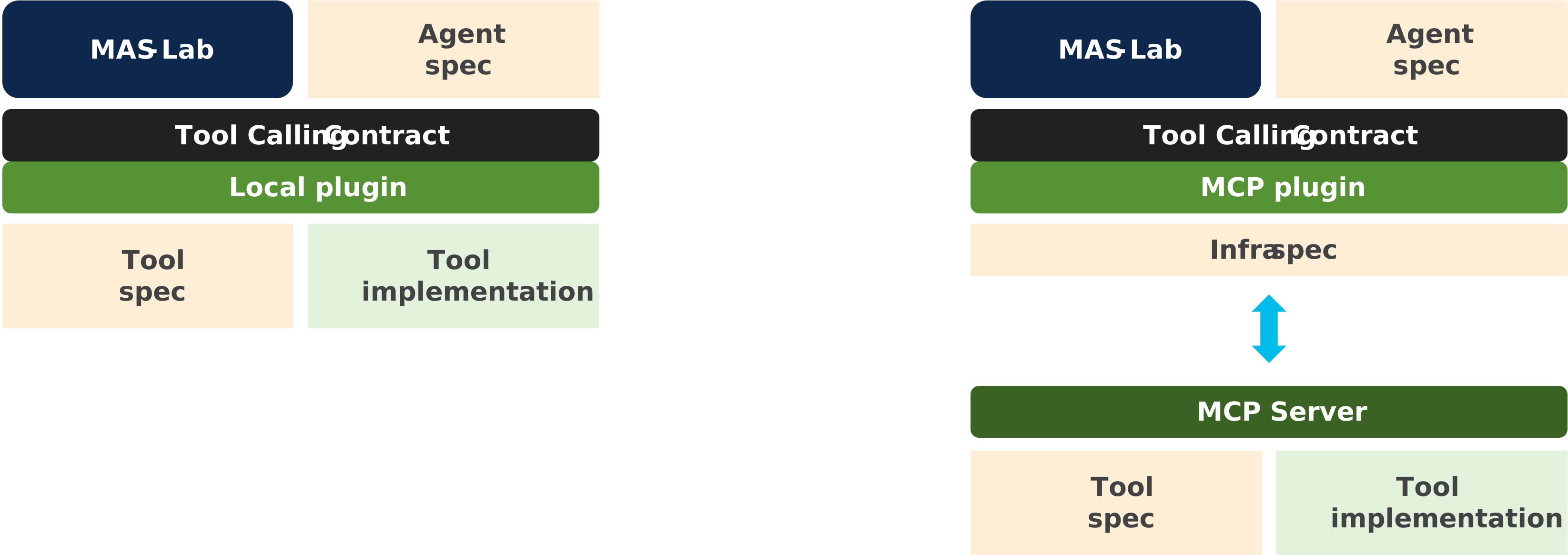
Figure 1: Selecting MCP replaces the execution adapter. The agent and tool contracts stay fixed.
Step 2 — Start the MCP provider¶
Expose only web-search through MCP:
mas-mcp serve \
  --tool-manifest library-samples/tools/web-search.tool.yaml \
  --tool web-search \
  --transport streamable-http \
  --host 127.0.0.1 --port 9001
The server keeps running, so leave it in this terminal. In another terminal, list and call the tool (no API key needed):
mas-mcp tools list --url http://127.0.0.1:9001/mcp
mas-mcp tools call --url http://127.0.0.1:9001/mcp \
  --tool web-search \
  --arguments '{"query":"MAS-Lab"}'
You should see web-search listed with its input schema, then search results (the live search needs network access). Stop the server with Ctrl-C when you finish Step 3.
Step 3 — Mix local and MCP tools¶
Tutorial 1's tools overlay gives the agent two logical tools, web-search and calc:
tools:
  $op:
    add:
      - ref: samples:tools/web-search.tool.yaml
      - ref: samples:tools/calc.tool.yaml
mixed-tools.infra.yaml
activates two providers:
tool_servers:
  - id: local-tools
    protocol: local
    tools: "*"
  - id: mcp-web-search
    protocol: mcp
    usage: use
    transport: streamable-http
    url: http://127.0.0.1:9001/mcp
    tools: "*"
Keep the Step 2 server running, then run the unchanged agent with it (needs OPENAI_API_KEY or a Tutorial 0 cache replay):
mas-ctl chat docs/tutorials/01-building-an-agent/agent.yaml \
  -o docs/tutorials/01-building-an-agent/overlays/tools.yaml \
  --infra-ref "$PWD/library-samples/infra/mixed-tools.infra.yaml" \
  -q "Find the current Apple share price, then calculate the cost of 3 shares." \
  --trace
In the exchange log, web-search goes over MCP and calc runs locally:
| Tool | Owner | Dispatch |
|---|---|---|
web-search |
mcp-web-search advertises it through tools/list |
MCP tools/call |
calc |
Not advertised by MCP; local manifests supply it | Local Python call |
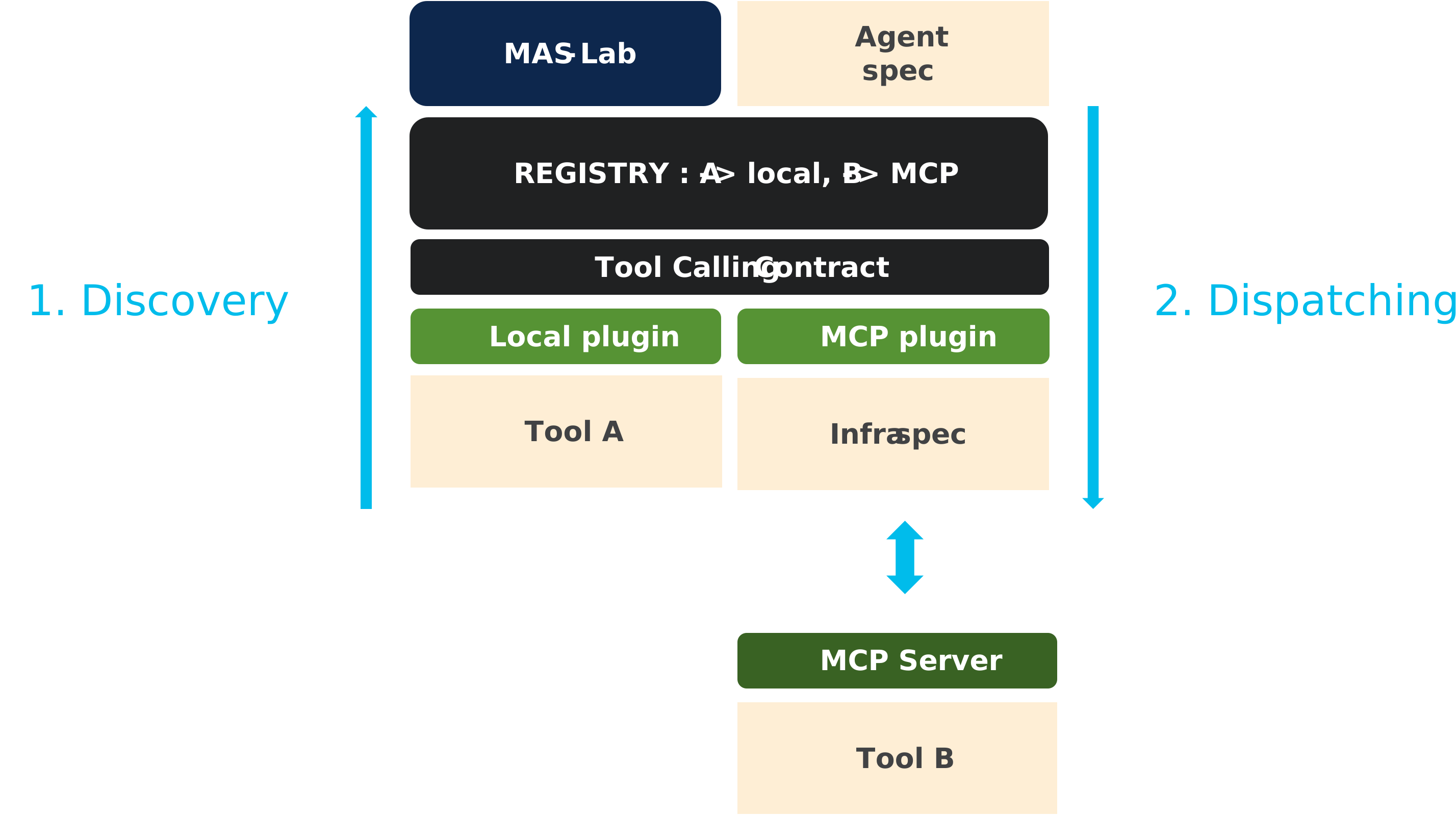
Figure 2: Discovery builds a name-to-provider registry once. Dispatch calls exactly one provider per tool call.
How the registry assigns owners:
- Each provider lists its tools: MCP through
tools/list, local from the resolved manifests. - An explicit claim beats a discovered claim. An external discovered claim beats the local catch-all.
- Duplicate claims of equal priority are errors. Once an external provider is active, every tool needs an owner.
Step 4 — Switch back to local access¶
Remove --infra-ref, so both names resolve to the implicit local provider. The Step 2 server is no longer needed:
mas-ctl chat docs/tutorials/01-building-an-agent/agent.yaml \
  -o docs/tutorials/01-building-an-agent/overlays/tools.yaml \
  -q "Calculate 28 + 22." --trace
What you learned¶
- A tool's contract is separate from where it runs. Only infra changed.
- MCP owns discovery, transport, and wire messages. Agent behavior, tool names, and schemas stay stable.
- The registry routes each tool name to exactly one provider.
Reference: ToolServerRegistry reference, infra.md § ToolServerRegistry, MCP compliance workflow.
Next¶
Tutorial 5 — A2A agents applies the same split to agent-to-agent delegation.